
The Problem:
Many users, and especially educators and parents, prefer not to have adult sites included in search
results. However, a student using a standard web search
engine, such as Google, Yahoo, Bing, etc., can easily come
across harmful adult material, even if they were not looking
for it. Many legitimate academic search terms can match the
content found on adult sites and appear in the search
results.
Fortunately, Google provides a way to filter the results. In fact, Google has spent many years perfecting their filtering technology to be the best in the industry. They use a combination of artificial intelligence, advanced image recognition, and a powerful community of billions of daily users that report offensive content to them. However, because of their need to appeal to a very wide audience, the default Google search settings are "moderate" instead of the "strict" setting which is needed for students. One can set Google results to be strict, but if a different browser or computer is used (student uses a computer at home), or cookies are cleared (they usually get cleared automatically over time, or you may have them turned off for privacy reasons), the results will go back to being just moderate and potentially unsafe. Further, it is difficult to even monitor if the results are in strict mode, since the main body of the search results look the same as regular Google search results.
Other search engines designed for students are available, but they don't come close to the quality of results that only Google can deliver. Further, training students how to use Google is an important skill these days. Just using a site with handpicked children sites is very limiting and misses out on new quality sites that come out on a daily basis. The relevancy matching of the results when compared to Google often pales in comparison, hampering the student's learning experience.
In our opinion and based on a lot of feedback from teachers and school administrators, there are many cases when even Google's safe filtered results are still not good enough. This can happen if a student is intentionally using an adult term in the search request. While not returning pure "adult" results when strict filters are set, the listed sites from these types of searches can still be offensive. For example, there are a lot of gray area art sites that we block. We describe our optimal free solution below that takes care of ensuring that Google SafeSearch filtering is always set at school or home, with multiple additional filtering layers we provide to make sure all results are truly student friendly.
The KidzSearch Solution:
KidzSearch offers a unique solution to this important
problem. When a search is done on KidzSearch.com, it can
only return Google "strict" search results and is not
dependent on any computer, cookie or browser settings. The
same trusted high-quality search results as Google are
returned, but without adult content mixed in them. In
fact, the results are actually from Google via our direct
partnership with them. We just enforce that they are fully
filtered for students.
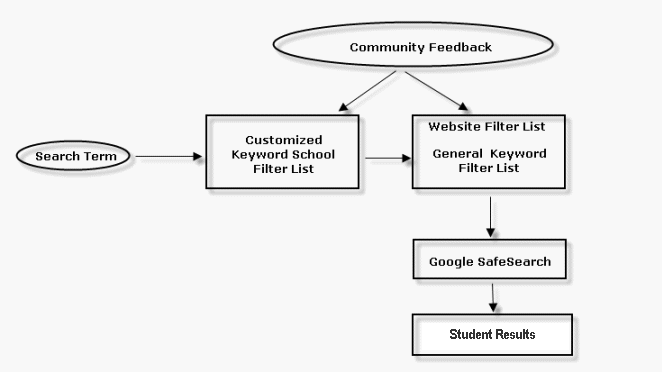
Further, KidzSearch maintains a constantly updated list of
banned keywords and adult site names that go beyond what
Google SafeSearch filters for added protection (see diagram
above). We don't allow a search to continue if a banned
search keyword is detected. We also have proprietary AI
filtering algorithms that
detect multiple word forms, spelling variations, tenses, and
more. Other checks remove
duplicate letters and code characters called "leet," which is the use of numbers to
try and get by filtering (for example: 1=i, 3=e), or other
secret code cloaking methods. We truly
feel KidzSearch is the best search tool for kids with the
most advanced keyword filtering system around. We have spent
over 10 years developing this technology.
We encourage you to try and get any offensive results in our search engine. If you do, please let us know so we can address the problem. All our search results have links after the results to report a problem listing. With 1000's of schools using us each day, it provides us with an army of monitors helping us make the product safer. When required, entire websites that Google SafeSearch has chosen to still allow are removed from the results based on KidzSearch community feedback.
The results returned are the same ones you get using Google,
but without all the harmful content. In addition, we have
special proprietary settings that skew the result ordering
so it shows sites that are likely to be more relevant to
students at the top. For example, there is an emphasis on
learning versus commercial sites.
Another useful feature relates to our unique autocomplete
keywords that appear when you type in a search. Students often find it challenging to correctly
identify and properly spell what they need to type when starting an online
search. While other search engines like
Google, Yahoo, and Bing provide predictive closest matching
autocomplete terms, the results are geared for a general
commercial audience and may even contain adult terms. KidzSearch is able
to use millions of anonymously collected student searches to provide the
most relevant matches specifically for student needs with a
scholastic bias in what is returned. We also spell-check and
correct them when needed. This helps teach
proper spelling habits for terms most likely to be seen by
students.
The KidzSearch homepage is your signal that safe internet
results will be returned. Further, all our search result
pages have a unique branded look which is your cue that the
results are being filtered. This allows parents and
educators to more easily monitor things from a distance.
KidzSearch
provides an
easy free solution for safe internet
usage when kids access their computer or mobile device from any location. Parents can be given instructions
to always have their children use KidzSearch at home. This
will ensure that they have a safe internet experience when they do their
homework. Further, you
may have internet filtering software on your home and school computer, but what happens when access is needed
on an unknown computer? We provide a simple free solution that can be
used from any computer in the world without requiring
software to be installed. The
KidzSearch App is a free download that works on all
mobile devices and is supported on Apple iOS, Google
Android, as well as on Amazon for Kindle fire devices. The
app is free to download. It provides the same filtering
technology as the desktop version. In addition, most of the
features kids enjoy, such as KidzTube, KidzTalk, etc., are
supported.
KidzSearch is compatible with all filtering software
solutions, such as
Open DNS. If possible, we suggest using a service such
as Open DNS to improve the safety of your network. Sites
like Open DNS contain a list of websites that may contain
harmful content. The list is updated often, but you really
need to use another layer of protection over it, like
KidzSearch to dynamically filter new sites that may not be
detected yet by their system. In addition, even if sites are
prevented from showing after clicking on them, it is best to
just not show them in the first place by using KidzSearch. Further, students at
home are not likely to have any DNS filtering software in
place, so KidzSearch provides a reasonable alternative that
is much safer than using a standard search engine.
Mobile / Tablet Solutions
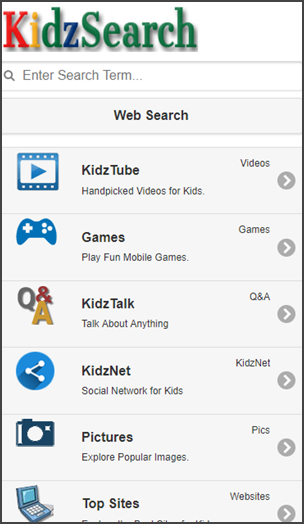
When the
KidzSearch Free App is installed, kids can safely browse
the internet. We strongly suggest removing all other
browsers on a device, which usually can be accomplished
using parental controls. Once this is done, a child cannot
directly enter any websites that are not "KidzSearch
approved" via our Safe Search application.
Our App is one of the most popular ways
parents and schools are able to make a tablet safe to use
both at home as well as on any wireless connection.
Who is using us?
1000's of
public and private schools trust and use us each day. We are also used
by many homeschools. Below are just some of our
customers:



U.S. Department of Defense Education Activity dodea Americas
Los Angeles Unified School District, CA
Hanford School District, Hanford, CA
New York City School District, NY
Fort Bend National School District, TX
Douglas County School District, Castle Rock, CO
Greece Central School District, NY
Charlotte-Mecklenburg Schools, Charlotte, NC
Owasso Public Schools, Oklahoma
Round Rock ISD Schools, Round Rock, TX
Long Beach Unified School District, Long Beach, CA
Northern York County School District, PA
St. Johns School, Quebec, Canada
Perth School District, Perth, Australia
Roomberg Institute, Cherry Hill, NJ
West Springfield High School, Springfield, VA
Princess Anne Psychological Associates, Virginia Beach, VA
Davis School District, UT
Berea City Schools, OH
Mesa Public Schools, AZ
Belgrades Schools, MT
Iron Country Schools, UT
Teacherweb
Symbaloo
Educator's Technology
Please
contact us for a more complete
list. We would also love to hear from you if you are a
current customer and want your school added to this list.
We provide a special search environment made just for kids that
includes:
 Results
that are always safe, even if cookies are cleared, or children use the site
on a different computer that has new browser settings. It may be confusing to a
student to use Google.com at school in safe mode, but when they are on another computer at home with default settings, that same site can return potentially
harmful adult content. We also provide additional keyword screening for extra
safety based on feedback from our large community of schools.
Results
that are always safe, even if cookies are cleared, or children use the site
on a different computer that has new browser settings. It may be confusing to a
student to use Google.com at school in safe mode, but when they are on another computer at home with default settings, that same site can return potentially
harmful adult content. We also provide additional keyword screening for extra
safety based on feedback from our large community of schools.
Quality results. KidzSearch filters out
and removes adult images, pictures and text. It does this without lowering
academic standards and provides the student with all necessary and proper
current educational material, unlike systems that only use limiting made-for-children websites.
Safe image results. We allow students
to safely browse images using proprietary screening algorithms.
Free learning games. Students have
access to thousands of the best online learning games to help teach subjects in
a fun and highly entertaining manner on just about any topic.
 Personalization Features.

Students can select their own background colors and themed wallpaper designs, which encourage use. They can also include their own personal messages. This type of customization can often help encourage students to use it more, which improves their online research skills. It is one of our most popular features.
Cost effective. Our system is free with
nothing to install. In addition, we are very responsive to customer requests, such as
filtering additional terms or blocking entire sites. We usually respond to
requests within a few hours.
Search results that are
geared more for kids are pushed higher to the top. Visual thumbnails and larger
fonts are also used.
When available, large image thumbnails are added to most results to help younger students select
the most relevant match. We also use a larger font to make things more readable
and fun. A traditional text-dense set of results can often be
overwhelming to children when they are learning to use a search engine.
Specialized
autocomplete that provides the most likely search terms as students begin typing in the search box based on millions of analyzed terms done
by schools who use us on on a daily basis. This proprietary feature helps
students find the best search terms for school homework and projects.
KidzSearch
has many other special sections that kids enjoy, like
Homework
Help where students can ask and answer school questions in a safe
monitored environment,
KidzSearch News
with interesting thought provoking daily stories and videos designed to get kids
thinking, KidzTube
hand-selected educational videos,
Safe Streaming
Music,
Boolify graphical search
teaching tool, and our popular
Top Sites guide
that has all the best free educational learning sites presented in a fun and interactive
format.
KidzSearch Voice Search is a unique
cutting-edge ability that allows students to conduct voice searches, which
includes web, video, and image results.
This
feature is currently only available to desktop chrome browser users, but
we working to expand it to other browsers, as well as mobile. It is
especially helpful for younger children that may not be able to use a
keyboard and disabled users.
 Proud member and accepted by the American
Library Association. We have been providing students with a safe
searching environment for over 10 years and are used by many schools around the
world.
Proud member and accepted by the American
Library Association. We have been providing students with a safe
searching environment for over 10 years and are used by many schools around the
world.

Rated as a Top 25 Learning Website
for Educational Quality by
Common Sense Media.
Read What Others Are Saying About Us!

"KidzSearch has got to be my number one search engine for middle schools..."
Jennifer Wagner, Family Technology Expert,
About.com

"Practical Tips for Parents:
Encourage your children to use child-friendly
search engines such as
KidzSearch," Zoe Brennan,
The Telegraph

"After exploring many different kid-friendly
search engines, we found KidzSearch to be the best overall in terms of providing
safety while also giving access to the widest amount of content." (5-star user
review)
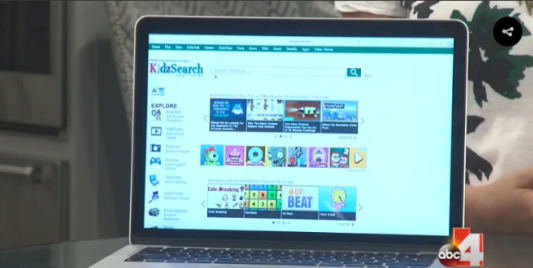
KidzSearch as Featured on
ABC4 News - Tech Time Tuesday
"I am a school librarian/technology coordinator
and LOVE your search engine"
"I am absolutely in love with this website,"
Krystal Taylor,
School Teacher
"I'm going to get super smart!" KidzSearch User
"...Best website ever." KidzTalk Fans
"...Keep your kids safe online." Clark Howard
"There are a number of great child-safe search engines out there, and I've tried a bunch of them over the years. After all my testing, I must say the one I like best is KidzSearch." Rick Rouse. A+ certified computer tech and blogger

Artwork made just for us by one of our loyal users!

Keep Your Kids Safe and Bookmark Us Today!



